By Daniel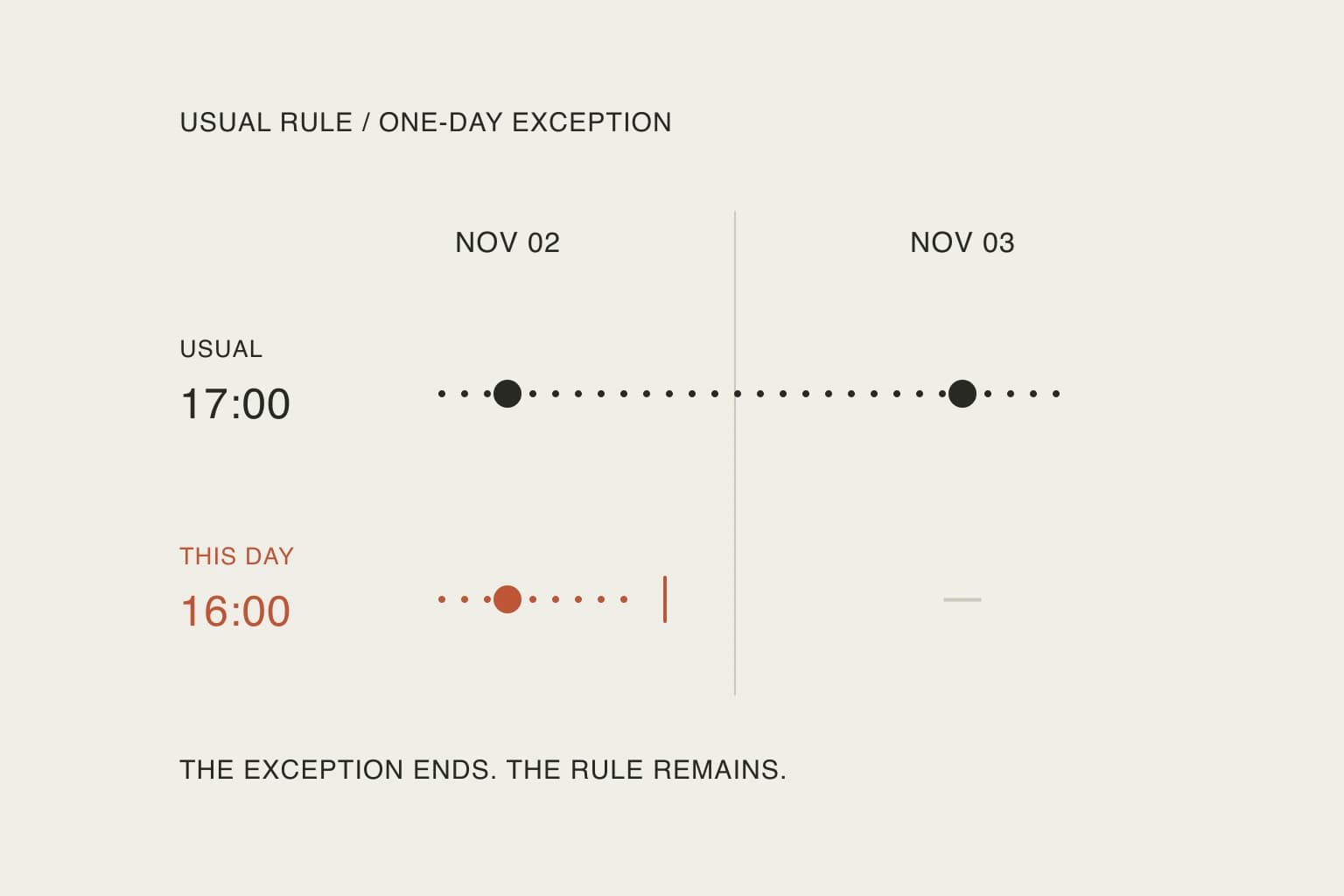
In this article
The October 12 changelog says Sunny can save a standing rule after repeating it back and asking for confirmation. It also describes a tighter distinction between durable facts and one-off details. On October 19, Sunsama added an Autoplan briefing that explains what it left untouched and why. Those are dated product updates, not a claim that AI planning first appeared this month.
This is an analysis of current documentation, checked October 24, 2026. We have not run a Sunny accuracy benchmark. The practical recommendation is to start with one useful rule, one explicit exception and a way to inspect both.
Optional help needs more than one switch
An October discussion asks a reasonable question about apps adding AI:
Something like flowsavvy, sunsama, or structured but that doesn't use AI?
— u/Scottieglot in r/ProductivityApps. This excerpt expresses one person’s preference. It does not establish how any app implements scheduling, or how many people want the same thing.
Sunsama’s Sunny guide says the assistant is enabled by default and can be turned off under Settings → Integrations → AI Assistant. An enterprise administrator can also disable it. That gives a reader who dislikes the chat a concrete place to start.
It is not a universal “no AI anywhere” switch. The separate privacy notes document controls for planned-time and channel predictions, plus automatic summaries that can be disabled or limited by integration. Turning off Sunny alone is not evidence that all other processing has stopped. These are documented controls, not the result of an independent data audit.
Write down the preference you actually have: no conversational assistant, no automated activity summaries, or no AI processing at all. Those are different requirements. For the last one, a feature toggle is not enough evidence; check the relevant policies and ask the provider about any uncertainty before connecting sensitive material.
Separate a rule, an exception and a task
Consider these invented statements:
Scroll sideways to compare →
| Statement | Intended scope | What you should check |
|---|---|---|
| “I usually finish work at 17:00.” | A continuing preference | The saved rule says “usual,” without claiming every day is identical |
| “On November 2, I need to finish at 16:00.” | One date | November 3 has not inherited the exception |
| “Prepare the parcel label.” | A task | It became an actionable item, not a permanent preference |
The distinction matters even if all three statements arrive in one paragraph. You are giving the assistant different kinds of information. The word “remember” should not be a substitute for deciding how long something remains true.
For example, a single short day does not establish a new working week. Likewise, a recurring wish to finish earlier does not automatically authorize moving an appointment. A preference describes how to choose; a task or appointment describes something to do. They should be inspectable separately.
Keep the rule small enough to disagree with. “Make my day better” has no clear failure condition. “Usually finish work by 17:00; ask when the chosen work cannot fit” gives you something concrete to evaluate. It also leaves room for a deliberate exception without silently redefining the default.
Try a two-day check before adding more rules
Use disposable tasks if you choose to evaluate the feature. The following is a proposed test, not a transcript of a successful run:
- Write down a normal finish time of 17:00 for two example days.
- Add a fixed 15:00 appointment on the first day and one flexible task on each day.
- Ask to save the usual finish preference, then inspect the wording before confirming it.
- Request a 16:00 finish on the first date only, preserving the appointment.
- Inspect both dates and the stored rule. The second day should still have the usual preference.
A useful request would be: “For November 2 only, help me fit the flexible work before 16:00. Keep the 15:00 appointment. Keep my usual finish time at 17:00 for other days. Show me any work that will not fit.”
The important outcome is not how confidently the answer reads. Check whether the exception stayed local, the appointment survived, and any unplaced task remains visible. If the assistant saves a different rule from the one you intended, correct that before trying a busier week.
Sunsama’s September 29 update documents change receipts with links and undo. Use the receipt to find the affected item, then inspect the item itself. A description of a change and the saved result are two useful checks, not interchangeable proof. Autoplan has also been labelled beta in the changelog; verify access in your own account instead of assuming every workflow is available everywhere.
Keep temporary context where you can find it
A conversation is not a reliable filing system for every detail of a routine. The Sunny guide says chat history is saved, but very long conversations lose their oldest context. A reopened thread therefore should not be your only way to know which standing instructions matter.
For a one-off task, a short return note may be more useful than another general rule: what happened, where to resume, and what remains undecided. For a repeated planning decision, a saved preference can reduce explanation. Choose based on the information’s lifetime, rather than putting everything into whichever text box is open.
You can also decide that a rule is not earning its maintenance. If you spend each morning explaining why it does not apply, narrow it, pause it where supported, or return to a manual decision. This is the same test worth applying to custom filtered lists: setup should remove a repeated decision, not generate another job.
Leave room for a direct action
Sunsama documents auto-scheduling separately from Sunny: you can invoke it for a task with X or Add to calendar, using configured schedules. Its guide warns that it only accounts for calendar events currently in view. That is a reason to inspect the calendar, not to assume the assistant knows every constraint.
Sometimes selecting a task and placing it is enough. Sometimes discussing an exception is useful. Neither requires turning every preference into permanent automation.
Nowrill keeps conversation in a connected external assistant and displays the saved day in the web planner. Whichever app you use, the valuable boundary is the same: make the change you intended, keep unrelated commitments intact, and leave tomorrow free of today’s accidental assumptions.
Useful resources
- Sunsama’s dated changelog — inspect the standing-rule, briefing and receipt updates in their release context.
- Sunny’s current guide — find the assistant control and chat-history limitations.
- Integration and AI privacy notes — check the separate prediction and summary controls before treating one toggle as comprehensive.
- Auto-scheduling guide — understand the explicit scheduling action and which calendar constraints it considers.